AI Security for Small Businesses: Why Zero-Trust Matters

A Beginner-Friendly Guide to Protecting Your Business in the AI Era
AI is moving fast, we're currently seeing chatgpt 5.2 models, claude opus 4.6, etc
Small businesses are using AI tools to:
- Write content
- Analyze data
- Automate emails
- Generate proposals
- Create marketing campaigns
- Build customer support systems
What used to require a team of 5 people can now be done by one person with the right AI tools.
That's powerful.
But here's the problem.
Most small businesses upgraded their tools, without upgrading their security.
And that is dangerous.
Why Small Businesses Are Now Prime Targets
There's a myth that hackers only target big companies.
Not true.
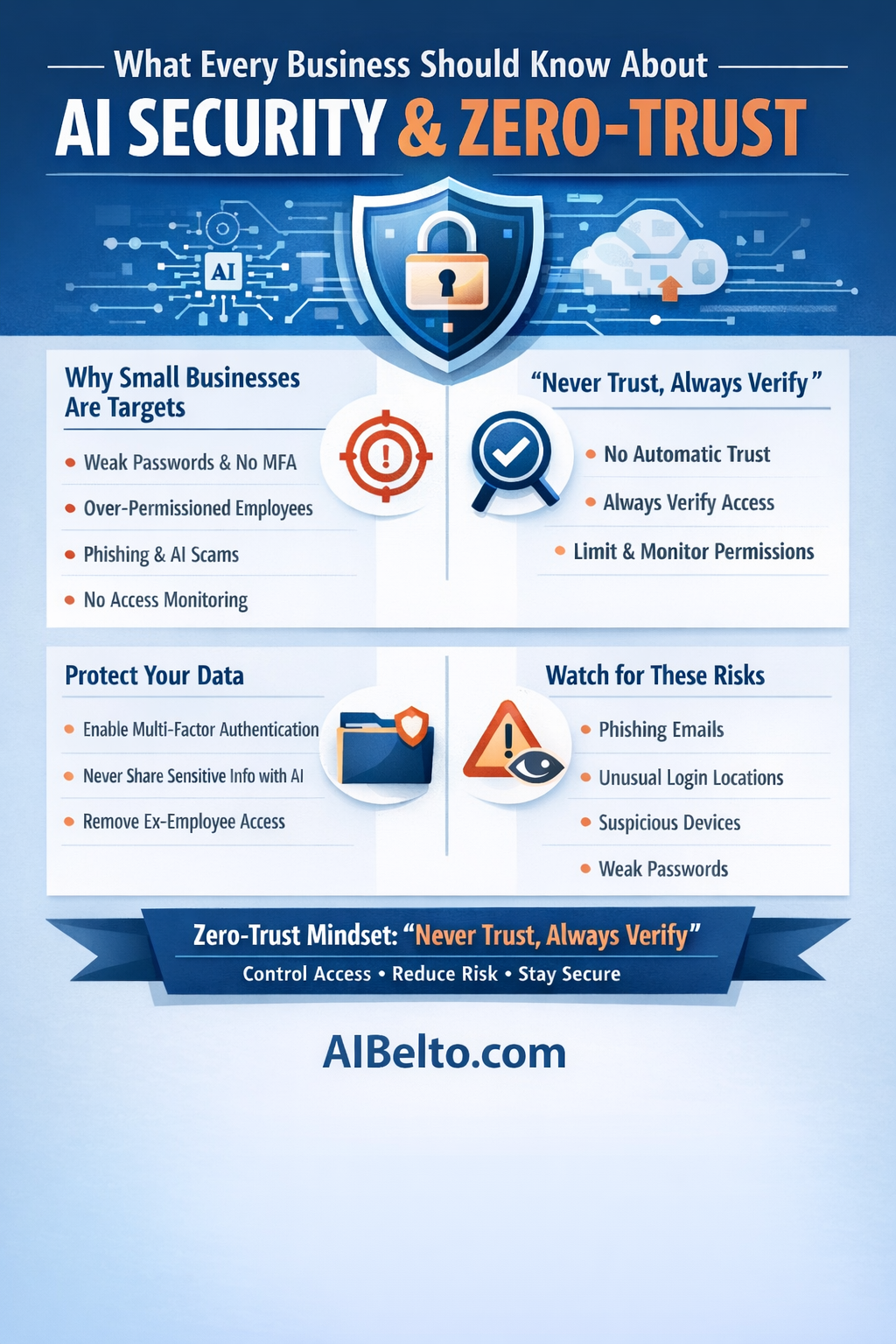
Small businesses are often easier targets because:
- Security is not a priority
- Passwords are reused
- Employees have too much access
- AI tools are used without clear policies
- Nobody is monitoring login activity
Hackers don't need to break into a bank vault.
They just need:
- One weak password
- One phishing email
- One over-permissioned employee account
And AI has made attacks smarter.
Today:
- Phishing emails are written perfectly.
- Fake invoices look real.
- Deepfake voice calls can impersonate managers.
- AI bots can scan thousands of small businesses automatically.
Small businesses are now automated targets.
If your business uses:
- Cloud tools
- AI platforms
- Remote employees
- SaaS software
You are exposed.
The question is not "Will someone try?"
The real question is "Are you prepared when they do?"
This is where Zero-Trust comes in.
Not complicated. Not technical. Not expensive.
Just a smarter way to think about security.
What Zero-Trust Actually Means (In Plain English)
Most small businesses operate on one silent assumption.
"If someone is inside our system, they're safe."
That assumption is the problem.
Zero-Trust flips this completely.
"Never Trust, Always Verify," Explained Simply
Zero-Trust is built on one core idea.
Never automatically trust anyone. Always verify.
Not your employee. Not your manager. Not your accountant. Not even yourself.
That doesn't mean paranoia.
It means structure.
Instead of saying "You're logged in, so you can access everything," Zero-Trust says "You're logged in. Now prove you should access this specific thing."
Access is:
- Limited
- Verified
- Continuously monitored
Every time.
Why Trust Is the Weakest Link
Traditional security works like this:
- Protect the perimeter (firewall, antivirus).
- Once someone logs in, they move freely.
That model worked when:
- Everyone was in one office.
- Software was on local computers.
- Data stayed inside the building.
That world is gone.
Now your business runs on:
- Cloud software
- AI tools
- Remote workers
- Shared logins
- Mobile devices
Your "perimeter" doesn't exist anymore.
If one login gets compromised, the attacker can move across:
- CRM
- Accounting software
- AI platforms
- Cloud storage
And you may not even notice.
Trust becomes the vulnerability.
Real-Life Example: How a Simple Breach Happens
Let's walk through a very realistic scenario.
A small business owner uses:
- Google Workspace
- An AI writing tool
- Accounting software
- A CRM system
An employee receives a convincing AI-generated email.
"Your AI subscription payment failed. Click here to update billing."
They click.
They enter their login details.
That's it.
Now the attacker has:
- Access to their email
- Access to password reset links
- Access to connected tools
Within minutes, the attacker:
- Resets passwords
- Downloads customer data
- Sends fake invoices
- Locks the business out
All because one account was trusted too broadly.
Zero-Trust would have:
- Limited that employee's permissions
- Required multi-factor authentication
- Triggered login alerts from new locations
- Restricted access to sensitive financial systems
The breach would have stopped early.
Or at least been contained.
Zero-Trust is not about being extreme.
It's about reducing damage when something inevitably goes wrong.
Because something eventually will.
The goal isn't "perfect security."
The goal is controlled impact.
How Small Businesses Get Compromised
Most small business breaches are not dramatic.
No hoodie-wearing hacker typing aggressively in a dark room.
It's usually simple.
And preventable.
Let's break down the most common ways small businesses get compromised today, especially in the AI era.
1. Phishing + AI = Smarter Attacks
Phishing used to be obvious.
Bad grammar. Weird formatting. Strange email addresses.
Not anymore.
AI now writes:
- Perfect grammar
- Natural tone
- Personalized messages
- Context-aware emails
Attackers can scrape LinkedIn, websites, and social media to learn:
- Your business name
- Your team members
- Your vendors
- Your tone
Then they generate emails that feel real.
Example:
"Hi Sarah, Quick reminder about the invoice we discussed last week for the Q1 marketing retainer..."
It feels specific.
It feels normal.
It's fake.
And one click is enough.
2. Compromised SaaS Accounts
Your business likely runs on:
- Email platforms
- CRM systems
- Cloud storage
- AI writing tools
- Payment processors
- Project management apps
Every one of those is a doorway.
If one login is compromised, attackers can:
- Reset other passwords
- Download customer data
- Export contact lists
- Send malicious emails from your domain
- Access financial records
Many small businesses:
- Share logins
- Don't remove old employees
- Reuse passwords
- Skip multi-factor authentication
That's not a technical problem.
That's an access control problem.
And that's exactly what Zero-Trust fixes.
3. Weak Password Habits
Let's be honest.
Small teams often use:
- The same password across tools
- Simple variations (Business123, Business124)
- Shared credentials in WhatsApp or email
- Sticky notes
- Browser-saved passwords without protection
If one platform gets breached, attackers try that same password everywhere else.
This is called credential stuffing.
It works more often than you think.
4. Over-Permissioned Employees
This is one of the biggest silent risks.
An employee needs:
- Access to social media scheduling.
But they are given:
- Admin access to the entire marketing stack.
Another employee needs:
- Access to customer support tickets.
But they are given:
- Full CRM export permissions.
When access is too broad:
- One compromised account becomes a full-system compromise.
Zero-Trust follows one rule.
Give the minimum access necessary. Nothing more.
The Real Issue: Convenience Over Control
Most breaches happen because businesses choose convenience over control.
- "It's easier to just share the login."
- "We'll fix permissions later."
- "It's just a small team."
- "We're not a big company."
Attackers don't care how small you are.
Automation allows them to scan thousands of small businesses per day.
They are not targeting you personally.
They are scanning for weakness.
And small businesses statistically have more of it.
The good news?
You don't need an IT department.
You don't need enterprise security software.
You need structure.
That's what we'll cover next.
How to Apply Zero-Trust Without Being Technical
You don't need to understand cybersecurity frameworks.
You don't need a security certification.
You just need to implement a few structured habits.
Zero-Trust is not a tool.
It's a mindset applied through simple actions.
Let's break it down.
Step 1: Lock Down Access (Principle of Least Privilege)
Ask yourself this.
For every team member:
- What do they actually need access to?
- What can be removed immediately?
If someone only needs social media scheduling, they should not have:
- CRM export access
- Financial software access
- Admin access to email systems
Most SaaS platforms allow you to:
- Create role-based permissions
- Restrict admin rights
- Control export capabilities
Start reviewing access today.
Remove anything unnecessary.
Less access equals less damage.
Step 2: Use Multi-Factor Authentication Everywhere
If you do only one thing from this ebook, do this.
Enable Multi-Factor Authentication (MFA) on:
- Payment platforms
- CRM
- AI tools
- Cloud storage
- Domain registrar
- Hosting account
MFA means even if someone steals a password, they still cannot log in without a second verification step.
That second step could be:
- An authentication app
- A security key
- A device approval prompt
Passwords alone are no longer enough.
In the AI era, they are easy to steal.
Step 3: Stop Sharing Logins
Shared credentials destroy accountability.
Instead of saying "Just use the main account," do this:
- Create individual accounts.
- Assign roles.
- Track login activity per user.
If something goes wrong, you can:
- Identify the source.
- Disable only that account.
- Contain the damage.
Zero-Trust is about traceability.
Step 4: Monitor Logins and Devices
Most business owners never check login history.
Start checking:
- New device logins
- Unusual countries
- Late-night access
- Multiple failed login attempts
Many platforms now provide:
- Security alerts
- Suspicious activity emails
- Device recognition
Turn them on.
You don't need to watch constantly.
You just need alerts enabled.
Step 5: Remove Access Immediately When Someone Leaves
This is critical.
The moment an employee, contractor, or agency stops working with you:
- Revoke access
- Change shared passwords
- Remove admin rights
- Disable integrations
Don't wait.
Not even 24 hours.
Former access is one of the most overlooked risks in small businesses.
Step 6: Create a Simple Internal Rule
You don't need a 40-page security policy.
Just one rule:
"No one gets access to anything without review. Access is limited and verified."
That's Zero-Trust in action.
What This Actually Does
Instead of trying to stop every attack (impossible), you reduce:
- The blast radius
- The speed of damage
- The amount of data exposed
Security is not about eliminating risk.
It's about controlling impact.
And small businesses that adopt this mindset become far harder targets.
Attackers prefer easy victims.
Make your business slightly harder, and you remove yourself from the "easy" list.
AI Tools, Data Privacy & Smart Usage
AI tools are powerful.
But they are also data processors.
And every time you paste something into an AI tool, you are:
- Uploading data
- Storing information externally
- Potentially training a system
- Creating digital records
Most small businesses are not thinking about this.
They're thinking about productivity.
Let's fix that.
What You Should Never Paste Into AI
This is a simple rule.
Never paste:
- Customer personal data (emails, phone numbers, addresses)
- Payment details
- Bank information
- Private contracts
- Confidential legal documents
- Internal financial reports
- API keys
- Login credentials
Even if the platform says it is secure.
Even if it says it does not train on your data.
Your job is to reduce risk, not assume safety.
If sensitive data must be used:
- Anonymize it.
- Remove identifying details.
- Use placeholders.
Example:
Instead of: "Customer John Smith with email [email protected] owes $4,200..."
Write: "Customer A owes $4,200..."
AI does not need personal details to give good output.
Understand the Tool You're Using
Not all AI platforms are equal.
Some are:
- Consumer-focused
- Public
- Shared environments
Others are:
- Enterprise-grade
- Contract-backed
- Privacy-controlled
Before adopting any AI tool in your business, ask:
- Does it offer business plans?
- Does it provide data privacy documentation?
- Does it allow admin controls?
- Does it support role-based access?
If a tool doesn't provide clarity, don't use it for sensitive work.
Convenience should never override risk awareness.
Limit AI Tool Access Like Any Other System
Zero-Trust applies to AI too.
Not everyone needs:
- Admin access to AI dashboards
- Billing control
- API generation permissions
Restrict access.
Assign roles.
Review usage logs if available.
Treat AI tools like financial systems, not toys.
Be Careful With AI Automation
Many businesses are now:
- Connecting AI to CRM systems
- Automating email replies
- Generating proposals automatically
- Syncing customer databases
Automation is powerful.
But if misconfigured, it can:
- Expose full customer databases
- Send incorrect information
- Leak private details
- Create compliance risks
Before connecting AI to your systems, ask:
- What exact data is being shared?
- Is it encrypted?
- Who can see the outputs?
- What happens if credentials are compromised?
Zero-Trust thinking means assuming something could fail, and designing for containment.
AI Policy for Small Businesses (Simple Version)
You don't need a complex compliance document.
Create a 1-page internal guideline:
- No sensitive data in public AI tools.
- MFA required for all AI platforms.
- Access reviewed quarterly.
- All integrations documented.
- Former employee AI access revoked immediately.
That's it.
Clarity prevents chaos.
The Businesses That Will Win
The businesses that thrive in the AI era are not:
- The ones using the most tools.
- The ones automating everything.
- The ones moving the fastest without structure.
They are the ones that combine speed with control.
AI increases capability.
Zero-Trust protects it.
Conclusion: The Businesses That Survive the AI Era
AI is not the risk.
Careless access is.
Small businesses now operate with:
- Enterprise-level tools
- Cloud infrastructure
- AI assistants
- Remote access
- Global exposure
But many still operate with:
- Informal security habits
- Shared passwords
- No access reviews
- No monitoring
That mismatch creates vulnerability.
Zero-Trust fixes that mismatch.
Not through complexity.
Through discipline.
Simple Next Steps
Today, do these five things:
- Turn on MFA everywhere.
- Review and reduce employee permissions.
- Stop sharing logins.
- Remove unused accounts.
- Create a simple AI usage policy.
That alone moves you ahead of most small businesses.
Final Thought
Security is no longer optional.
In the AI era, it is part of leadership.
You don't need to become technical.
You just need to become intentional.
Zero-Trust is not fear.
It's structure.
And structure protects growth.