OpenCode Can Build Anything - If You Stop Writing Bad Prompts

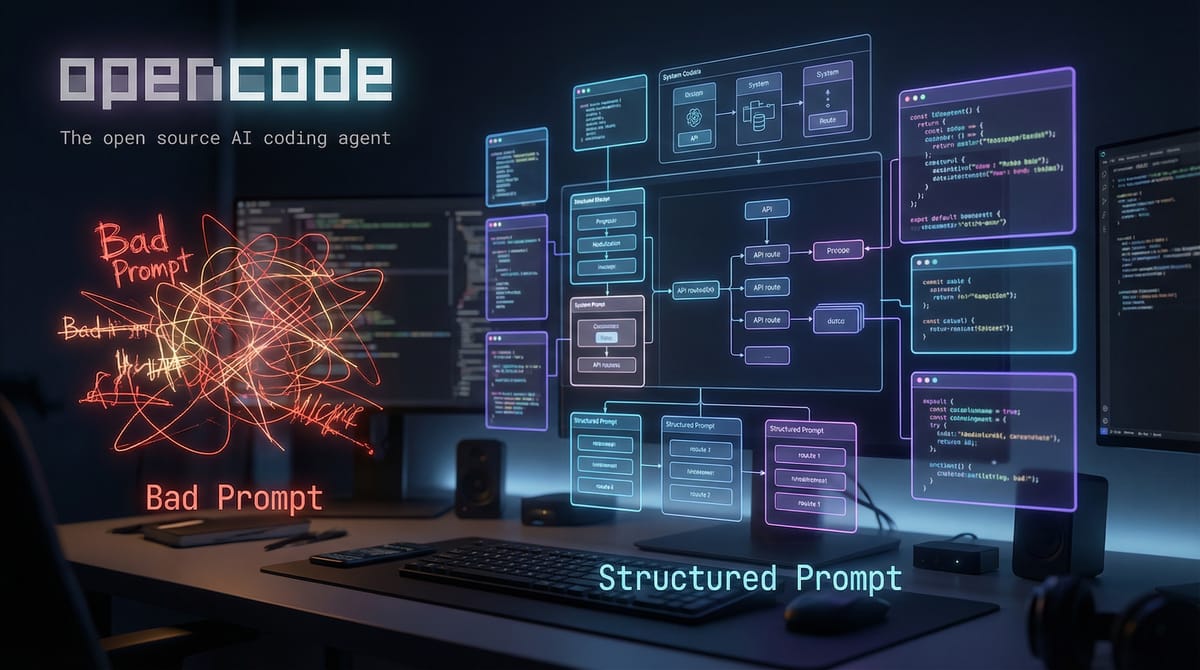
The Real Problem Isn't AI. It's Your Prompt
Look, most people say AI coding tools "don't work."
But here's what they actually mean: "I gave it a vague instruction and got vague output back."
That's not an AI problem. That's a thinking problem.
Whether you're using OpenCode, GitHub Copilot, or whatever AI dev tool is hot this week, the results depend entirely on how well you explain what you want built.
AI isn't a mind reader. It's a pattern executor.
When you say "Build me a SaaS app," you get generic folder structure, basic auth, placeholder UI, zero real business logic, no constraints, and no edge case handling.
Then you conclude AI can't build real software.
Wrong. AI can build seriously sophisticated systems, but only when you describe them like an actual system designer would.
Why Most Prompts Fail
Most bad prompts share the same four problems.
1. No Clear Objective
They describe the category instead of the outcome.
Bad: "Build a dashboard."
Good: "Build an admin dashboard that lets me filter users by registration date, export to CSV, and flag suspicious accounts."
See the difference?
2. No Constraints
AI needs boundaries. Without them, it just guesses at everything.
What stack? What architecture? What deployment target? What performance level? What auth method?
If you don't specify, it fills the gaps randomly. And you won't like the result.
3. No User Context
Software isn't code. It's behavior for a specific user.
If you don't define who's using this, what problem they're solving, and what success looks like, you get scaffolding instead of a product.
4. No Edge Cases
AI won't automatically think like a paranoid engineer.
If you don't mention invalid input, empty states, rate limiting, auth failures, data corruption, or pagination limits, you get a fragile system that breaks the moment someone does something unexpected.
The Truth: AI Builds Structure, Not Intent
Here's the thing. AI doesn't invent product strategy. It executes instructions.
Shallow instruction? Shallow output.
Architectural instruction? Architectural output.
That's the shift everyone's missing. The real skill in 2026 isn't coding anymore. It's system articulation.
The Prompt Framework That Actually Works
Here's the structure that consistently produces quality output.
When you want to build something, structure your prompt in this exact order:
1. Role
Tell the AI who it is.
Example:
Act as a senior full-stack engineer specializing in scalable SaaS architecture using Vite, React, TypeScript and Node.js.
Why does this matter? Because role influences code style, architectural decisions, folder organization, and error handling.
2. Objective
Be stupidly precise.
Bad:
Create a social media tool.
Good:
Build a web app that generates optimized Instagram captions for small businesses based on product description input.
Specific always wins.
3. Target User
Example:
"Target users are small business owners with no technical background."
Now the AI adjusts UI simplicity, field labeling, error messaging, and flow structure accordingly.
4. Stack Constraints
Example:
"Use Vite, React, and TypeScript for frontend. No database. Store generated outputs temporarily in memory. No Prisma. No ORM."
Notice how constraints remove randomness.
5. Feature Breakdown
Break it into actual components.
Instead of
"Add auth,"
say this:
"Implement simple email and password authentication using JWT stored in HTTP-only cookies. No OAuth."
Clarity equals control.
6. Edge Cases
Add them explicitly:
- If input is empty, disable submit button
- If API fails, show retry message
- If caption exceeds 2200 characters, truncate intelligently
- Add loading state
This is how you move from demo to product. Most people skip this step, which is why their stuff breaks immediately.
7. Output Requirements
Tell AI what format you want:
- Provide folder structure first
- Then provide full code files
- Use well-commented code
- No unnecessary libraries
Otherwise, it improvises. And AI improvisation is usually terrible.
Let's Apply This Properly
Example: Social Caption Generator Tool
You want to build a SaaS that generates social captions.
Most people do this:
Wrong Prompt
"Build me a social media caption generator tool."
What happens? You get basic text input, a mock "generate" function, random placeholder logic, no real marketing intelligence, no hashtag structure, and no platform differentiation.
It looks like a school project.
Correct Detailed Prompt
Here's how you should actually write it:
Act as a senior SaaS product engineer.
Build a web-based social media caption generator tool for small business owners.
Stack:
- Frontend: Vite, React, TypeScript
- Styling: Tailwind
- Backend: Simple Express server
- No database
- No Prisma
Objective:
Users enter:
- Product name
- Product description
- Target audience
- Tone (Professional, Playful, Luxury, Minimal, Bold)
- Platform (Instagram, LinkedIn, X)
The tool should:
- Generate 3 caption variations
- Automatically adjust character count based on platform
- Include optimized hashtags (5–10 for Instagram, 3–5 for LinkedIn, 2–3 for X)
- Avoid generic hashtags like #business #marketing
- Ensure captions include a soft call-to-action
UI Requirements:
- Clean 2-column layout
- Left: input form
- Right: generated captions
- Each caption should have a "Copy" button
- Include loading state animation
- Disable submit if required fields are empty
Edge Cases:
- If user enters more than 500 characters in description, show warning
- If generation fails, show retry option
- Prevent duplicate caption variations
Output:
- First provide folder structure
- Then provide complete code files
- Use clear comments
- Keep architecture modular
Notice what changed here.
You didn't ask for "a tool." You designed an actual product.
That's the difference between toy output and production-level output.
Example 2: Building a Real Micro SaaS (The Right Way)
Let's say you want to build a simple invoicing SaaS for freelancers.
Most people write this:
❌ Wrong Prompt
"Create a SaaS invoicing app with login and payments."
This is completely useless.
Why? Because there's no user type defined, no invoice structure, no tax handling logic, no currency support, no status lifecycle, no PDF generation logic, no deployment constraints, and no scaling assumptions.
AI fills in the blanks randomly. And you don't want random architecture. You want controlled architecture.
✅ Correct Detailed Prompt
Here's how you should actually write it:
Act as a senior full-stack SaaS architect.
Build a minimal but production-structured invoicing SaaS for freelancers.
Stack:
- Frontend: Vite, React, TypeScript
- Backend: Node.js, Express
- Database: PostgreSQL
- ORM: None (use simple query layer)
- Auth: JWT stored in HTTP-only cookies
Target User:
Solo freelancers issuing 1–50 invoices per month.
Core Features:
- User authentication (register/login/logout)
- Create invoice
- Edit invoice
- Mark invoice as paid
- Download invoice as PDF
- Dashboard summary (Total revenue, unpaid invoices, overdue invoices)
Invoice Data Structure:
- invoice_id
- user_id
- client_name
- client_email
- line_items (array of description, quantity, price)
- subtotal
- tax_percentage
- total
- status (draft, sent, paid, overdue)
- due_date
- created_at
Business Logic:
- Automatically calculate subtotal
- Automatically calculate tax
- Automatically update status to "overdue" if due_date passed and unpaid
- Prevent editing invoice after marked paid
Edge Cases:
- Prevent negative values
- Prevent empty client name
- Validate email format
- Prevent duplicate invoice IDs
Security:
- Protect all invoice routes by auth middleware
- Ensure users can only access their own invoices
Output:
- Provide DB schema first
- Then backend routes
- Then frontend components
- Keep code modular and scalable
Now look at what happened.
Instead of "Build invoicing SaaS," you designed the data model, state transitions, auth logic, constraints, user scope, and validation rules.
Now AI builds something coherent. That's the entire difference.
Example 3: Admin Dashboard (Done Properly)
Admin dashboards are where vague prompts completely collapse.
Most people write:
❌ Wrong Prompt
"Build an admin dashboard with users and export."
This guarantees no filtering logic, no pagination, no rate limits, no performance optimization, no role separation, and no audit logs.
It becomes a toy.
✅ Correct Prompt
Here's how you should structure it:
Act as a backend-focused system engineer.
Build an admin dashboard for managing platform users.
Stack:
- React, TypeScript frontend
- Node, Express backend
- PostgreSQL
User Roles:
- Admin
- Moderator
Dashboard Features:
- List users with pagination (20 per page)
- Filter users by:
- Registration date range
- Status (active, suspended, flagged)
- Search by email or user ID
- CSV export of filtered results
- Flag user as suspicious
- Suspend/unsuspend user
Performance Constraints:
- Use indexed DB queries
- Prevent loading entire user table into memory
- Limit CSV export to 10,000 rows max
Security:
- Protect routes with role-based middleware
- Log admin actions in audit_log table
Edge Cases:
- Handle empty state
- Handle invalid filters
- Prevent moderator from deleting admin
Output:
- Provide DB schema
- Provide route structure
- Provide frontend layout structure
- Provide middleware example
Now this is real.
You're no longer "asking AI to build." You're orchestrating architecture.
Using Skills to Supercharge This (skills.sh & Persistent Skill Systems)
Here's where most people miss the advanced layer.
Even if you write good prompts, you're still rewriting context every single time.
That's wildly inefficient.
This is where structured skill systems come in. One example is skills.sh, which lets you define reusable behavior instructions for AI agents.
Instead of repeating "Use Vite, React, TypeScript," "No Prisma," "Use modular architecture," "Comment clearly," and "No unnecessary libraries" in every single prompt, you define it once as a skill.
Example: SaaS Architecture Skill File (skills.md)
Here's what a reusable skill might look like:
# SaaS_Architect_Skill

You are a senior SaaS architect.

Rules:
- Always use modular folder structure.
- Separate routes, controllers, and services.
- Avoid Prisma.
- Prefer lightweight setups.
- Include validation logic.
- Include edge case handling.
- Include security considerations.
- Provide folder structure first.
- Comment all critical logic.

Frontend:
- Vite, React, TypeScript.
- Clean functional components.
- No unnecessary dependencies.
- Use Tailwind for styling.

Backend:
- Node, Express.
- JWT auth via HTTP-only cookies.
- Role-based middleware.
Now instead of rewriting everything, you just say: "Use SaaS_Architect_Skill. Build an invoicing tool."
The AI inherits your entire architectural philosophy. That's leverage.
Why Skills Beat Random Prompting
Without skills, every prompt is isolated.
With skills, you build consistency across everything you create.
This is how serious builders operate. You create an API skill, a SaaS skill, a dashboard skill, a marketing tool skill, and a security audit skill. Then you reuse them everywhere.
That's how you move from "AI user" to "AI orchestrator."
The Advanced Layer: Prompt Like an Architect
If you want OpenCode to truly "build anything," you need to think in layers.
Here's how architects actually think:
1. Think in Modules
Instead of "Build feature," think in terms of auth module, billing module, user module, admin module, and notification module.
Break it apart before you even start.
2. Think in States
Every system has states. Always.
Example for an invoice:
- Draft
- Sent
- Paid
- Overdue
If you don't define states, AI won't define them properly. It'll just make something up, and it'll probably be wrong.
3. Think in Failure Scenarios
Ask yourself: What if the API fails? What if the DB connection drops? What if a user sends invalid JSON? What if someone brute-forces the login?
If you don't specify this stuff, AI won't proactively design protection for it.
4. Think in Scale
Ask these questions upfront:
- What happens at 10 users?
- What happens at 10,000?
- Is pagination implemented?
- Are indexes used?
Architecture is anticipation. If you don't think about scale, you'll rebuild everything later.
Final Rule
OpenCode can build almost anything. Seriously.
But only if you stop prompting like a beginner and start describing like a system designer.
Bad prompt: "Build me a SaaS."
Good prompt: "Act as a senior SaaS architect. Use modular design. Implement JWT auth, role middleware, validation, error handling, and scalable structure. Provide schema first."
That difference changes everything.
Real Example: Building a Social Caption SaaS (Full Orchestration Example)
Let's combine everything we've talked about.
You want to build a production-ready social caption generator SaaS.
Most people still do this:
❌ Weak Advanced Prompt
"Use my SaaS skill and build a caption generator with login."
Still vague. Even with skills, a vague objective gives you weak output.
Now let's do it properly.
✅ Elite-Level Prompt (Layered + Skill-Aware)
Step 1: Architecture Phase
Use SaaS_Architect_Skill.

Do not write code yet.

Design the full architecture for a social caption SaaS.

Requirements:

Target users:
Small business owners generating marketing captions.

Core modules:
- Auth module
- Caption generation module
- Hashtag intelligence module
- Caption history module
- Rate limit module
- Admin monitoring module

Constraints:
- Vite, React, TypeScript
- Node, Express backend
- PostgreSQL
- JWT via HTTP-only cookies
- No Prisma

Business rules:
- Instagram max 2200 characters
- LinkedIn max 3000 characters
- X max 280 characters
- Prevent duplicate outputs
- Include CTA automatically

Security:
- Rate limit generation endpoint
- Protect history routes
- Log suspicious activity

Output:
1. System diagram (text format)
2. Database schema
3. API route structure
4. Folder structure
You review the architecture first. Fix weaknesses. Add missing logic.
Only then do you move to implementation.
Step 2: Backend Implementation
Based on approved architecture:

Implement backend only.

Requirements:
- Modular structure
- Centralized error handler
- Validation middleware
- Rate limiting on caption endpoint
- Audit log for admin actions

Provide full code files.
Comment critical logic.
Step 3: Frontend Implementation
Now implement frontend.

Requirements:
- Clean 2-column layout
- Form validation
- Loading state
- Error state
- Copy-to-clipboard button
- Caption history tab
- Responsive layout

Use Tailwind.
No unnecessary dependencies.
Step 4: Security Hardening
Review the entire system.

List:
- Security weaknesses
- Performance bottlenecks
- Scalability risks
- Suggested improvements for 10k daily users
Now this is orchestration. Not prompting. Orchestration.
The Prompt Architect Checklist
Use this before asking AI to build anything.
🧠 PROMPT ARCHITECT CHECKLIST
Before hitting "Generate," ask yourself:
1. Did I define the role?
If not, AI defaults to generic.
2. Did I define the exact outcome?
Not the category. The outcome.
3. Did I define the user?
Software without user context is hollow.
4. Did I define the stack?
Otherwise AI just guesses.
5. Did I break it into modules?
If not, it becomes monolithic and messy.
6. Did I define states?
Every serious system has states.
7. Did I define business rules?
Character limits, tax logic, status transitions, all of it.
8. Did I define edge cases?
Empty input. API failure. Auth errors. Rate limits.
9. Did I define security expectations?
Middleware. Validation. Rate limiting. Access control.
10. Did I control output format?
Structure first. Then implementation. Then refinement.
If you skip 5 of these, you're gambling.
If you use all 10, AI becomes unfair leverage.
The Silent Advantage: Consistency
Random prompting gives you random quality.
Structured prompting gives you consistent architecture.
Skills give you persistent intelligence.
Layering gives you refinement.
Multi-agent review gives you resilience.
This is how you go from "AI hobbyist" to "AI system builder."